
Where to Start with AI: A Practical Framework for Getting Started (Without the Hype)
Where to Start with AI: A Practical Framework for Getting Started (Without the Hype)
I’ve worked with various clients in my AI consulting practice, many of whom are just starting out. Lots of people are enamored by flashy demos and hype and want to see how AI works for them.
They come to me with questions like:
- “We saw this demo and it looks amazing—can you help us implement it?”.
- “I want an agentic AI multi-agent workflow [insert other buzzwords here] to automate away XYZ using OpenAI”.
- “Should we use [insert latest AI vendor]?”.
- Everyone else is using AI, and we need to come up with our AI strategy, but we don’t know how to.
They’re excited (or feeling a bit of FOMO), they’re ready to invest, but they don’t know where to start (and are worried that everyone else is already starting and that they’ve fallen behind).
I tell them: “Before we talk about vendors or enterprise solutions, let’s figure out if AI can actually solve your problem. And the best way to do that? Start with prompts.”
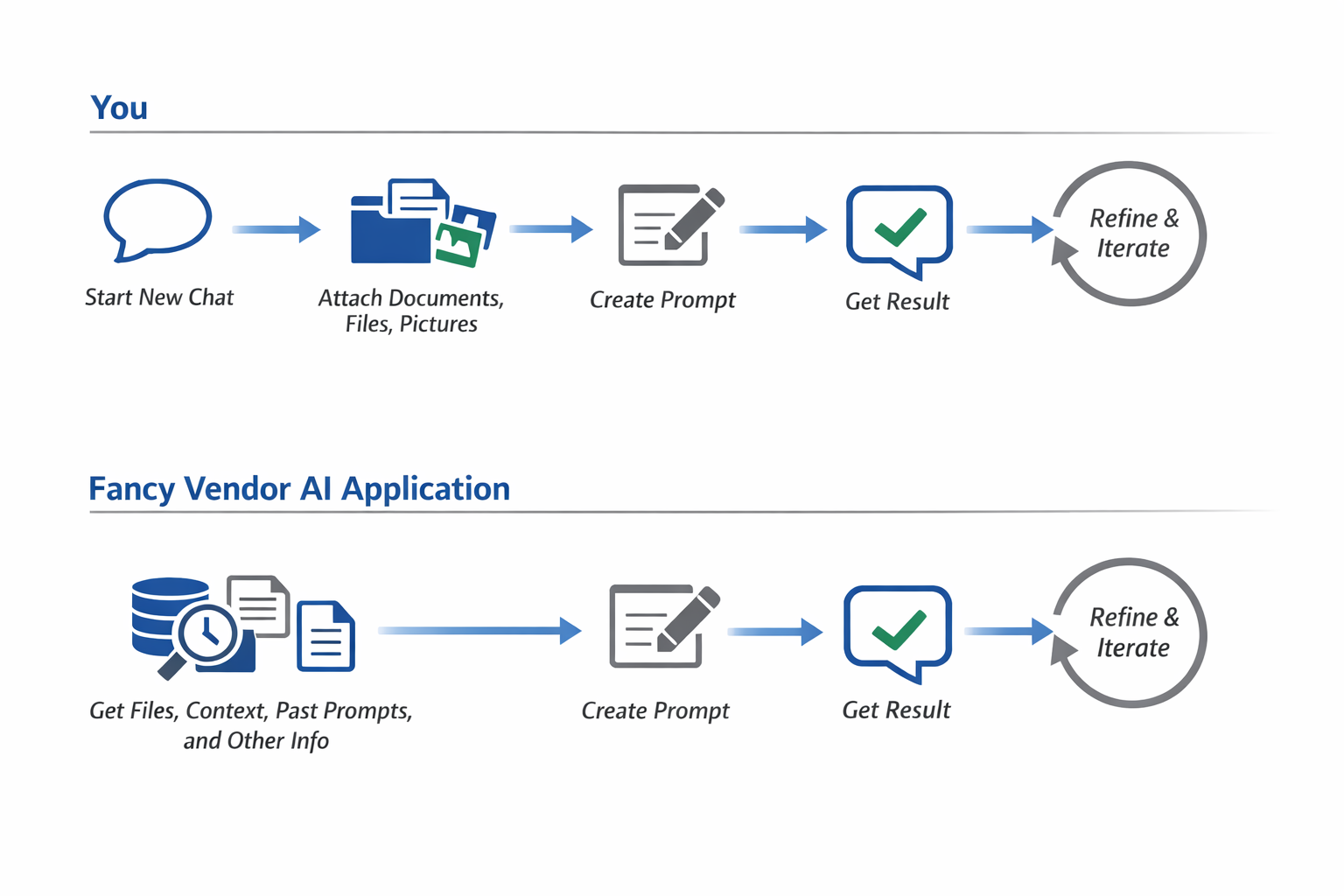
At the end of the day, any AI tool is fundamentally a series of prompts, stitched together clever ways. I’ve built many agentic AI applications myself and you can see the “chain” of prompts that are working under the hood to do all the magical AI things that people see.
There’s an art and skill of creating these seamless experiences with AI, and I’m not brushing that off. However, when you’re starting out, it’s good to remember that at a high level, AI applications are all powered by ChatGPT (or some other similar LLM) under the hood. So, the best way to know whose AI applications are best at doing your tasks is to try it yourself.
The Framework I use to advise
After working with and advising many clients, I’ve found that successful AI adoption for this sort of use case follows a predictable pattern. Here’s the framework I use, and why each stage is necessary.
The 4-stage progression:
| Stage | What You’re Doing | Why It Matters | Typical Duration |
|---|---|---|---|
| Part 1: Prompts | Writing and iterating on manual prompts | Builds intuition for AI capabilities and limitations | 2-4 weeks |
| Part 2: Tools | Using off-the-shelf AI applications | Validates use cases before major investment | 2-4 weeks |
| Part 3: Automation | Building simple workflows (optional) | Scales validated workflows when needed | 2-4 weeks |
| Part 4: Vendors | Evaluating enterprise solutions | Only when you have clear requirements and scale needs | Ongoing |
What each part looks like
Part 1: Write your own prompts - You’re learning what AI can do, what it can’t, and what inputs produce what outputs. It’s manual, it’s slow, but it builds the intuition you need for everything else.
Part 2: Use off-the-shelf tools - Someone else has figured out the basics, and you’re adapting their approach to your needs. You’re still cooking everything up yourself, but with better tools. This isn’t your regular ChatGPT chat anymore. Instead, it’s more specific tooling like powerpoint presentation builders, AI-embedded word docs, image generators, etc. Increasingly, big tech companies like Google and Microsoft are embedding these into their apps by default, so you likely have seen these off-the-shelf tools without even knowing it (e.g., Google’s AI summaries in their search tool, Microsoft Copilot, Applie Intelligence).
Part 3: Build simple automations (optional) - You’ve done this task enough times that you want to streamline it. You’re seeing repetition in how you’re using the tools. You find yourself doing something like:
- Download the latest Excel reports
- Pass them to ChatGPT (or some other app).
- Paste in this specific prompt.
- Download the results.
- Paste those results into a different Excel sheet.
- Write an email with the latest results and attaching that Excel sheet that you just created.
Part 4: Explore vendors - Only now, when you understand the tools from first principles, you’ve built intuition for what AI can and cannot do, and you’ve tried automating things yourself, should you explore vendors. You know what features matter, what’s marketing fluff, and what you’re actually paying for.
“Can’t we just rush through these steps?”
I get this question a lot. Clients want to skip ahead, especially if they’re under pressure to show results quickly. “Can’t we just spend a day on prompts and move to tools?” or “Why can’t we evaluate vendors while we’re learning prompts?”
Here’s why rushing backfires: The more you skip, the worse your outcomes get. Each stage builds intuition that the next stage requires.
- Prompts → Tools: Without prompt intuition, you can’t evaluate if a tool’s AI is actually good or just marketing.
- Tools → Automation: Without validating a use case works, you’ll automate something that doesn’t deliver value.
- Automation → Vendors: Without understanding your exact needs, you can’t cut through vendor hype or negotiate effectively.
Go through these steps slowly and intentionally, documenting what works and what doesn’t, keeping track of your learnings, iterating on your approach—is what builds intuition about AI tools. This isn’t busywork; it’s the foundation.
At the end of the day, your intuition for how AI tools work and when to use them is going to be one of your biggest competitive advantages. Having access to all the AI tools in the world doesn’t matter if you don’t know which ones are good for certain tasks, which ones are overhyped, and how to evaluate new tools as they emerge.
Some things to consider after each part:
- After Part 1: Do you understand what AI can do for your use case? If no, keep practicing prompts. If yes, move to Part 2.
- After Part 2: Does an off-the-shelf tool solve your problem? If yes, you might be done. If no, consider Part 3.
- After Part 3: Do you need enterprise features (security, compliance, support, scale)? If no, your automation might be sufficient. If yes, Part 4.
The key insight: Most organizations stop at Part 2 and never need vendors. The ones that do need vendors are much better positioned to evaluate, negotiate, and implement because they understand their requirements from first principles.
Part 1: Write your own prompts
Key takeaway: If you can’t write a prompt to do it yourself, neither can anyone else.
Benefits of writing your own prompts
Benefit 1: Creating your own personal prompt library
As you build your own prompts, you create your own personal “prompt library”. This has MANY benefits, including:
- Being a part of your own proprietary AI secret sauce
- Gives you a set of prompts for different use cases
- Lets you build your own “test” to test against any new LLMs
I write in more detail about this topic in this blog post.
Benefit 2: Intuition for how AI works on your use case
A lot of press and hype focuses on how AI is, for example, smarter than the smartest mathematicians. But unless you’re working on building math proofs, writing code, or other specific tasks that these benchmarks care about, those test scores don’t matter to you (and even if you do work in those fields, AI doing well on those doesn’t mean they’ve automated you away). Having your own prompt library lets you build intuition for how the different AI models do for the things that you care about.
It doesn’t matter how well AI can solve other people’s problems. It matters how well it solves yours
Benefit 3: Separate reality from hype
For all the hype about how great ChatGPT is, I still sometimes find it messing up on really obvious mistakes (e.g., punctuation, not knowing how to interpret a word, etc.) that a human wouldn’t make. This doesn’t discount how powerful these tools are, but it also shows you where they still have room to grow.
Benefit 4: Spotting common issues in AI
You’ll learn some of the common problems and gotchas that happen with LLM applications, such as hallucination, context drift, and formatting. You’ll see, for example, that when you provide LLMs tables, LLMs like tables formatted in a very specific way.
Benefit 5: Confidence
By doing it consistently yourself, you build up confidence to know when AI is the right tool versus when to use traditional methods. You also have more grounding on when to believe statements about AI versus when to discount the hype.
Some pro tips for doing this well
Do a basic “Prompting 101” course
There are plenty of courses and guides for how to do prompting. I would recommend starting with the ones from major AI companies, as these are the most in-depth and are written by the people who build the LLMs.
For courses, some to look at are:
- Google Prompting Essentials Specialization
- Coursera: Prompt Engineering For Everyone with ChatGPT and GPT-4
- Coursera: Prompt Engineering for ChatGPT
These are really invaluable resources for getting started, and anyone wanting to work with ChatGPT or LLMs in any capacity should really start here. Everything in GenAI comes down to prompts, so you should learn Prompting 101.
Learn from other people’s prompts
Many people across industries have found and written about ChatGPT prompts that they use for their specific workflows. If you’ve opened up LinkedIn for any bit of time, you’ve likely encountered these influencers yourself. Don’t believe the overhyped “this ONE prompt will solve ALL your problems” claims, but I also suggest trying some of these prompts yourself. I write more about how to do this well in this blog post.
Common mistakes to avoid (and what to do instead)
Taking a “Prompting 101” class should give you the basis of what a good prompt looks like. In addition to those, I’ve written about many common mistakes I’ve seen people make when using ChatGPT, and how to avoid them.
Some things to keep in mind as you write your own prompts
- What information do you have to include in the prompt for it to give you the answer you want?
- Start by identifying the minimum viable context. What does the AI absolutely need to know?
- Example: To summarize a report, it needs the report. But does it need your company’s entire history? Probably not.
- What is the least amount of information that you can give to an AI for it to tell you the right answer? (AI models, like humans, can get distracted and confused when you give them unnecessary extra information).
- Strip away everything non-essential.
- Can you get the same quality result with less context? If yes, use the shorter version.
- How many times do you have to prompt the AI for it to give you the answer you want?
- Track your iteration count. If you’re consistently needing 5+ iterations, your initial prompt might be too vague.
- The goal is to get to 1-2 iterations for routine tasks. More iterations are fine for complex, novel problems.
- What format does the output need to be in?
- Specify format upfront: “Format as a bulleted list” or “Create a markdown table” or “Write in email format”.
- This prevents rework and ensures the output fits your workflow.
- What constraints or guardrails are important?
- Word count limits, tone requirements, style guidelines, compliance considerations.
- Example: “Write a 200-word summary in a professional tone, avoiding technical jargon”.
- What would make this output wrong or unusable?
- Think about failure modes upfront. What mistakes would be costly? If you trusted the LLM’s output and it were wrong, what kind of wrong conclusions could you make from those outputs and how would that affect you?
- Example: “Do not include any financial projections, only historical data”
Key tip: Imagine ChatGPT is like a super-powered human intern. If you’re not specific with what question you’re asking, the intern might go off and do the task in an unexpected way (since they don’t have the context that you have). If you give this super-intern 10 years worth of documents and you ask them to write a document for it, it might do a reasonable job (and probably be pretty impressive that it can go through 10 years worth of PDFs) but it won’t know, unless you tell it, which documents are important and how they relate to each other. No matter how smart the intern is, if the intern doesn’t know what you know abot how to do this specific problem the way that you know it should be done, it’s unlikely to do it the way that you know it should be done. You’re the expert here, not the LLM.
How to know you’re ready for Part 2
You’ve mastered Part 1 when you can answer “yes” to these questions:
- Reliability: Can you consistently get useful outputs for your use case? (Not perfect every time, but reliably good enough)
- Efficiency: Are you getting results in 1-2 prompt iterations for routine tasks?
- Evaluation: Can you spot when an output is wrong, incomplete, or off-target?
- Prompt Library: Do you have a small collection of prompts (5-10) that work well for your common tasks?
- Intuition: Can you explain why certain prompts work better than others?
- Adaptation: When you see a new use case, can you quickly draft a prompt that gets you 80% of the way there?
If you’re still struggling with these, spend another week or two in Part 1. There’s no rush, and building this foundation saves time later.