
How to automatically optimize your prompts
How to automatically optimize your prompts
In the AI world, the quality of your prompts determines the quality of your AI experience. How do you know that you’ve written the best prompt that you could’ve? There are automated ways to perfect your prompts, and here I’ll go over both basic and advanced methods for doing so.
Basic methods of automated prompt optimization
Here are some basic ways to automatically optimize your prompts.
- You can ask an LLM to rewrite your prompt. LLMs are actually quite good at being able to write their own prompts.
- The most basic way to optimize your prompts is to use a prompt improver. For most people, this gets the job done just fine. Here’s an example prompt improver.
You also may very well not even need to do this, given that ChatGPT, Claude, and other AI websites automatically rewrite your prompt anyway under the hood when you press submit (see, for example, this writeup to learn more).
You can also work on improving your ability to write a good prompt, as well as knowing what to ask for and how to ask for it. To learn more about this, check out this blog post.
Advanced algorithms: GEPA
Motivating example
Our motivating example is asking an LLM to be a spam filter. Let’s say, for some reason, LLM spam filtering is bad. They’re not, but let’s just use that as an example, and you had to define criteria for what to filter. We’ll also put this in the form of a prompt (though astute technical readers will see that this could very well be a regex search; we ignore this for simplicity’s sake)
Let’s say that our first prompt is something like:
You are a spam filtering LLM. You catch emails and label them as spam. An email is spam if it contains the word “free”.
Let’s say that we have 1,000 emails that we want to check for spam, and let’s say out of that 1,000 emails, 100 actually have spam.
GEPA
GEPA (short for “Genetic-Pareto”) is a prompt optimization technique. It’s used in tools such as DSPy and is one of the cutting-edge ways to do prompt optimization.
How does GEPA work?
If you had to optimize a prompt yourself, one way to go about it is just to take your prompt and ask ChatGPT to improve it.
Clever you though has another insight: you run the prompt, you see where the LLM got the wrong answer, and then you ask ChatGPT: “I asked my LLM this prompt and I got this answer, can you fix the prompt so it’ll do better next time?”
However, the LLM might come back and ask you “OK, I could do that, but what does ‘better’ mean to you?”, at which point you clarify your prompt and say “I asked my LLM this prompt and I got this answer, can you fix the prompt so it’ll do better next time (by better, I mean it’s more creative)?”
In an overly simplified way, this is the key insight that GEPA has. GEPA, at its core:
- Runs a prompt on some examples.
- Grades the example on some metric for what “good” looks like.
- Keeps the prompt if it “looks good” based on the metric.
- Asks an LLM “OK, here’s the prompt I tried, here’s how it did on this metric, here’s where it went right/wrong, can you fix it?”
- Takes that updated prompt, does it all over again.
An example of GEPA in practice
Setup
Caveat: this is an overly simplified implementation. The actual paper formalizes the degrees of freedom for modifying this algorithm
Let’s go back to our previous example. Let’s say that our first prompt is something like:
You are a spam filtering LLM. You catch emails and label them as spam. An email is spam if it contains the word “free”.
Let’s say that we have 1,000 emails that we want to check for spam, and let’s say out of that 1,000 emails, 100 actually have spam.
Now let’s say that only 100 emails have the word “free” and out of this, 20 emails are spam. That gives us something like the following breakdown:
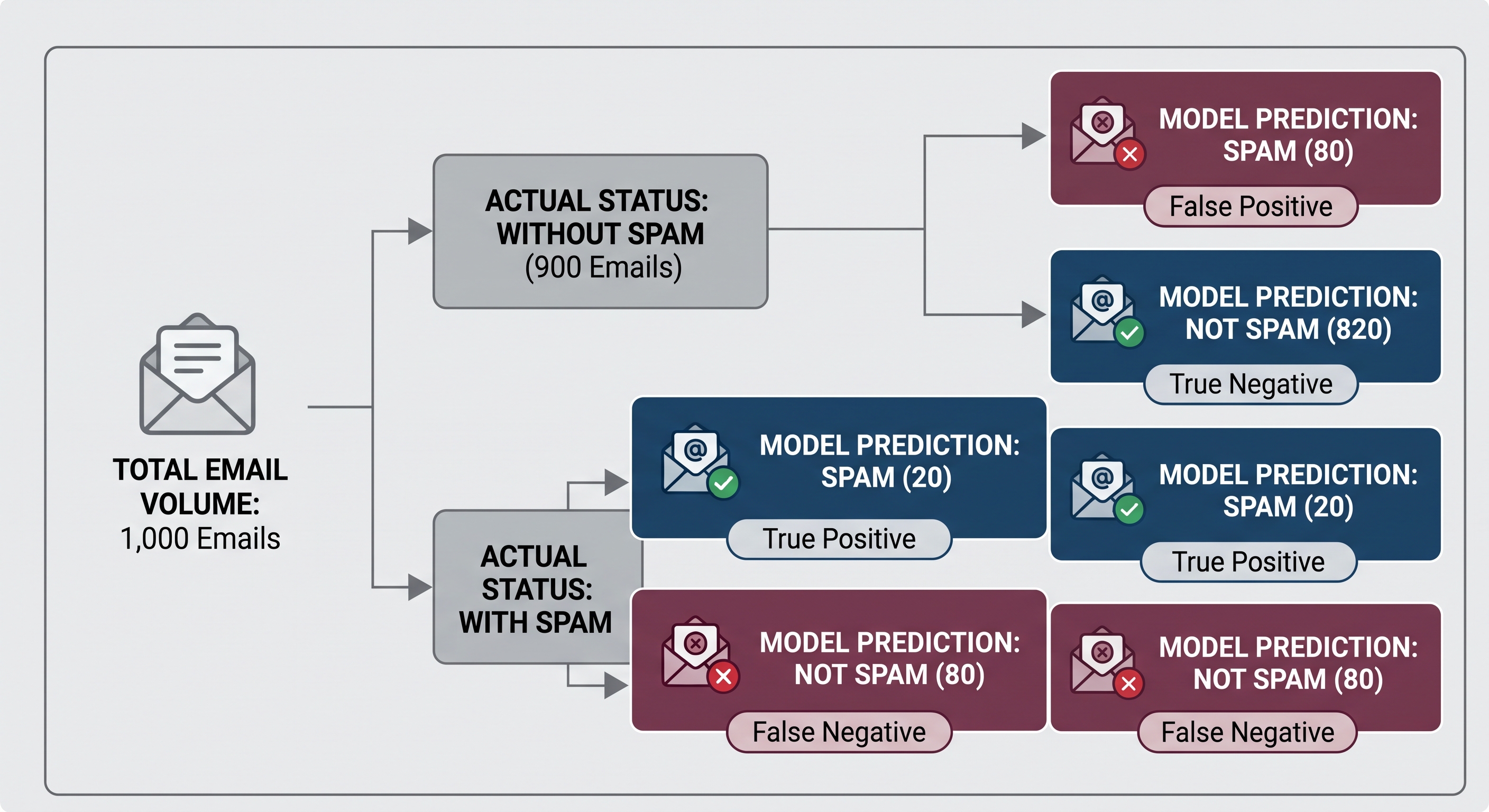
Let’s split our 1,000 emails into 10 folders of 100 emails each. Then, let’s optimize our prompt on one folder at a time.
Folder 1: Let’s grab the first folder of 100 emails. Let’s run our prompt on this folder:
You are a spam filtering LLM. You catch emails and label them as spam. An email is spam if it contains the word “free”.
Using this rule on our first folder of 100 emails gives us something like:
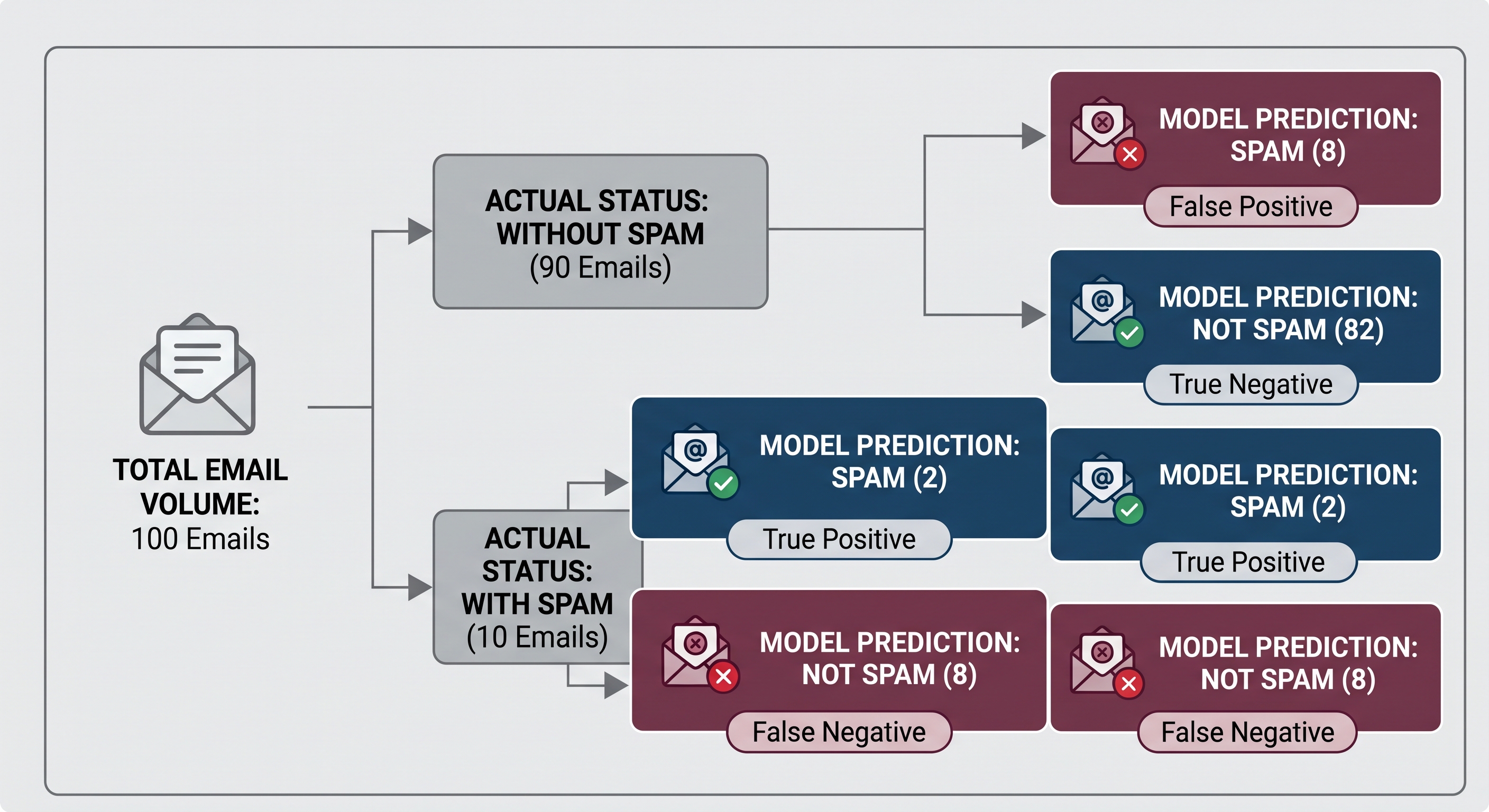
Our accuracy was 84%, which seems like it’s not bad until you realize that marking everything as not spam would’ve gotten you 90% accuracy. Our recall is 0.2 (meaning, we captured 2 spam emails out of 10 actual spam).
We can do better than this! Letting 8 out of 10 spam emails through is pretty bad!
Let’s say that we pass this now into ChatGPT:
You are helping me optimize a prompt for an LLM that classifies emails as spam or not spam.
My current prompt is:
"You are a spam filtering LLM. You catch emails and label them as spam. An email is spam if it contains the word 'free'."
I ran this prompt on 100 emails. Of these emails, 10 were actually spam and 90 were not spam.
Here were the results:
- True positives: 2 (spam correctly identified as spam)
- False positives: 8 (legitimate emails incorrectly identified as spam)
- False negatives: 8 (spam emails incorrectly identified as legitimate)
- True negatives: 82 (legitimate emails correctly identified as legitimate)
Accuracy: 84%.
Spam recall: 20%.
Spam precision: 20%.
Here are some examples of emails the model got wrong:
False positives:
- "Your free trial has expired. Update your billing information to continue using our service."
- "Your free shipping benefit has been applied to your recent order."
- "You're free to reschedule your appointment at any time."
False negatives:
- "Congratulations! You've been selected to claim a $500 gift card. Click here to collect your prize."
- "URGENT: Your account will be suspended unless you verify your information immediately."
- "You've won! Respond now to receive your exclusive reward."
Based on these results, rewrite my spam classification prompt to improve its performance.
Preserve the objective of identifying spam while reducing false positives and false negatives. Return a complete replacement prompt.
Notice that we aren’t just asking ChatGPT to improve the prompt. We’re telling it what prompt we tried, how it did, what the right answers should’ve been, and other information that it would need to improve the prompt.
Turn 1: Our first optimized prompt
Let’s say that after all that, we get this prompt from ChatGPT:
You are an email spam classifier. Classify each email as SPAM or NOT_SPAM.
An email is spam if it contains strong indicators of unsolicited promotional, fraudulent, or deceptive content.
Indicators include:
- Claims that the recipient has won a prize or reward.
- Urgent requests to click a link or provide personal information.
- Suspicious offers promising money, gifts, or other benefits.
- Language pressuring the recipient to act immediately.
Do not classify an email as spam solely because it contains promotional language or words such as "free." Legitimate transactional, account-related, and personal emails may contain these words.
Return only SPAM or NOT_SPAM.
ChatGPT found other rules that we can use to improve our old prompt. Now we can try this to see how it does.
Let’s run our new prompt on the same folder of 100 emails. For the sake of our example, let’s imagine we get the following results:
| Metric | Original prompt | Turn 1 |
|---|---|---|
| True positives | 2 | 6 |
| False positives | 8 | 10 |
| False negatives | 8 | 4 |
| True negatives | 82 | 80 |
| Accuracy | 84% | 86% |
| Spam recall | 20% | 60% |
| Spam precision | 20% | 37.5% |
We’ve improved the accuracy, recall and precision of our classifier! Our new prompt is already better than our old prompt. We’ve detected 6 (out of 10) spam emails correctly, better than the 2 from the old classifier.
However, we do have room here to improve. Namely, we’ve increased the number of false positives from 8 to 10 and. The new prompt is better than the old prompt but it could still be improved.
Turn 2: Our second optimized prompt
When we optimized our original prompt, we explicitly said that we dont’t want the spam detector to flag an email just because it says “free”. But let’s say that the LLM was a little too literal and treats anything with the word “free” as spam. We can use that clue while we’re asking ChatGPT how to improve the prompt:
Here is the revised prompt you generated:
[Insert the Turn 1 prompt]
I evaluated it on the same 100 emails.
Accuracy increased from 84% to 86%, and spam recall increased from 20% to 60%. However, false positives increased from 8 to 10.
Here are examples of emails that the revised prompt incorrectly classified as spam:
- "URGENT: Your appointment has been moved to tomorrow. Please confirm your availability."
- "Congratulations on your promotion! You've been selected to receive an employee recognition award."
The model appears to be treating words such as "urgent," "congratulations," and "selected" as suspicious without sufficiently considering their context.
Revise the prompt to address this failure mode while preserving its improvements in spam recall. Return a complete replacement prompt.
Let’s imagine that we get this prompt:
You are an email spam classifier. Classify each email as SPAM or NOT_SPAM.
Evaluate emails based on their overall meaning and context, rather than the presence of individual keywords.
Strong spam indicators include:
- Unsolicited claims that the recipient has won money, prizes, or rewards.
- Requests for sensitive information under suspicious or deceptive circumstances.
- Urgent calls to action involving suspicious links, payments, or account verification.
- Implausible financial offers or promises of guaranteed benefits.
Consider whether the email has a plausible legitimate purpose, such as:
- Confirming an appointment or transaction.
- Providing an account or service notification.
- Communicating with an employee, customer, or colleague.
- Delivering an expected promotional message.
Words such as "free," "urgent," "congratulations," and "selected" are not sufficient evidence of spam on their own.
Classify an email as spam when its overall content provides substantial evidence of unsolicited, deceptive, or otherwise unwanted messaging.
Return only SPAM or NOT_SPAM.
Let’s imagine that this time, we get the following results:
| Metric | Original prompt | Turn 1 | Turn 2 |
|---|---|---|---|
| True positives | 2 | 6 | 8 |
| False positives | 8 | 10 | 5 |
| False negatives | 8 | 4 | 2 |
| True negatives | 82 | 80 | 85 |
| Accuracy | 84% | 86% | 93% |
| Spam recall | 20% | 60% | 80% |
| Spam precision | 20% | 37.5% | 61.5% |
We see that the prompt from Turn 2 is much better!
How much longer can we do this for?
We could continue to iterate on this until we decide to stop. There’s a few ways we could decide when to stop:
- Once we hit a certain accuracy or recall.
- On a fixed number of rewrites.
- Once the metrics stop improving.
Thus far, we’ve also only run this prompt on the first folder of 100 emails. We could imagine that once we’ve got a prompt that works well on the first 100 emails, we want to try it on the next folder of 100 emails, until we’ve decided that the prompt is “good enough”.
Theoretically, we’d do this until we decide that our score is “good enough”.
Seeing where the “Genetic-Pareto” in GEPA comes from
We also used the “latest” prompt each time (e.g., in Turn 2, we used Turn 1 as the basis for what prompt ChatGPT could optimize). GEPA doesn’t require this. Instead, GEPA allows you to keep a pool of “candidates” and those candidates are considered at each turn, and a candidate is only added to the pool when it meets some threshold or improves a metric as compared to the other candidates.
The “genetic” in GEPA comes from the “mutation” and “evolution” that comes from asking ChatGPT to update a prompt each turn. The “pareto” in GEPA comes from the Pareto Principle, where there could be a few rules or strategies that, though only few in number, can in aggregate represent a large proportion of the sample space.
Caveats and things to consider
- What are you optimizing for? You need to have a strict definition of what you’re optimizing for. For example, if we wanted to optimize a spam classifier, we should have a sense for what we’re trying to classify as spam in the first place.
- Is your data a good dataset for optimizing your prompt? If we want to optimize a prompt for spam classification, we probably want a diverse set of emails that represent all the ways that spam might show up.
- Are you optimizing the right metric? For something like spam, we want to make sure that we’re looking at recall, not just accuracy, as if the base rate of spam is 1%, for example, then an optimal algorithm could get 99% accuracy by always guessing that an email is not spam.
- More optimization doesn’t mean better performance: At some point, optimization doesn’t mean your prompt will do any better. GEPA might start to result in prompts, for example, where the LLM learns rules, such as hard-coding in the prompt the cases that it’s getting wrong, that won’t actually help you when you use that prompt on the task you care about.
- Optimization costs time and money: depending on how many rounds of optimization you do, the cost in time and money does add up.
Using GEPA in production
In practice, the GEPA algorithm can be used to optimize prompts for AI agents and other LLM-powered components of your AI applications. The way I use it is something like:
- I have a dataset of examples (either a fixed dataset of examples or a random sample of production traces).
- I have a series of scorers (e.g., various calibrated LLM-as-a-judge scorers).
- I run the existing model against the dataset of examples and get examples.
- If the scores don’t meet some threshold or SLA that I’ve set, I try to (among other non-prompt tweaks) optimize the prompt using GEPA.
- I see if GEPA optimization causes an improvement in the metrics that I care about. I also inspect the prompt itself to see if it “makes sense” and would cause a regression or interrupt other metrics we care about (like token cost or TTFT).
- I run the new prompt on a holdout set.
- I then deploy this gradually, seeing if key metrics hold, before shipping it (this is not unique to prompt-related fixes, but rather just generally true for any harness changes).
I typically run this once a week at most. I found that running it more often than that led to noisy prompt updates. I also find that prompts, once written and optimized once, generally don’t need much tuning afterwards. There are other parts of the harness where additional time and attention reaps higher rewards.
However, I’ve found that running GEPA is also a good place to evaluate other parts of the AI architecture, For example, an optimized prompt that is significantly different from the original prompt could be a sign of poor optimization, but that poor optimization could also be caused factors such as:
- There being a noticeable drift in the quality or the nature of the production traces as compared to past versions.
- Poor calibration of the LLM as a judge scores.
- Us measuring metrics that may not actually represent the product direction that we care about.
Each of these factors, in and of themselves, is worth investigating, and the GEPA optimization is used more for its ability to sniff out these drifts rather than for what prompt the calibration actually generates.
Takeaways
Being able to write good prompts is an important skill in the AI world. Here are some basic and advanced automated methods that I use in my own work for making sure that my prompts are automatically optimized on a regular basis.